Feature
Shadow IT detection: every device on the network, no blind spot
What you have not inventoried, you cannot patch, cannot secure and cannot evidence. OneLog detects unknown devices automatically, assigns a trust status and isolates shadow IT before it becomes a point of entry.
The blind spot on the network
Every asset you do not know about is one you do not protect. The private laptop on the guest Wi-Fi, the forgotten test server, the IoT device from building services, the employee’s switch under the desk — shadow IT rarely arises maliciously, but it arises constantly. And precisely these devices are missing from the inventory, receive no patches and appear in no compliance evidence.
Conventional RMM tools manage only what already carries an agent. Anything without an agent does not exist for them. OneLog reverses the logic: instead of managing only the known, it continuously reconciles the actual network with the managed inventory — and makes the difference visible.
How detection works
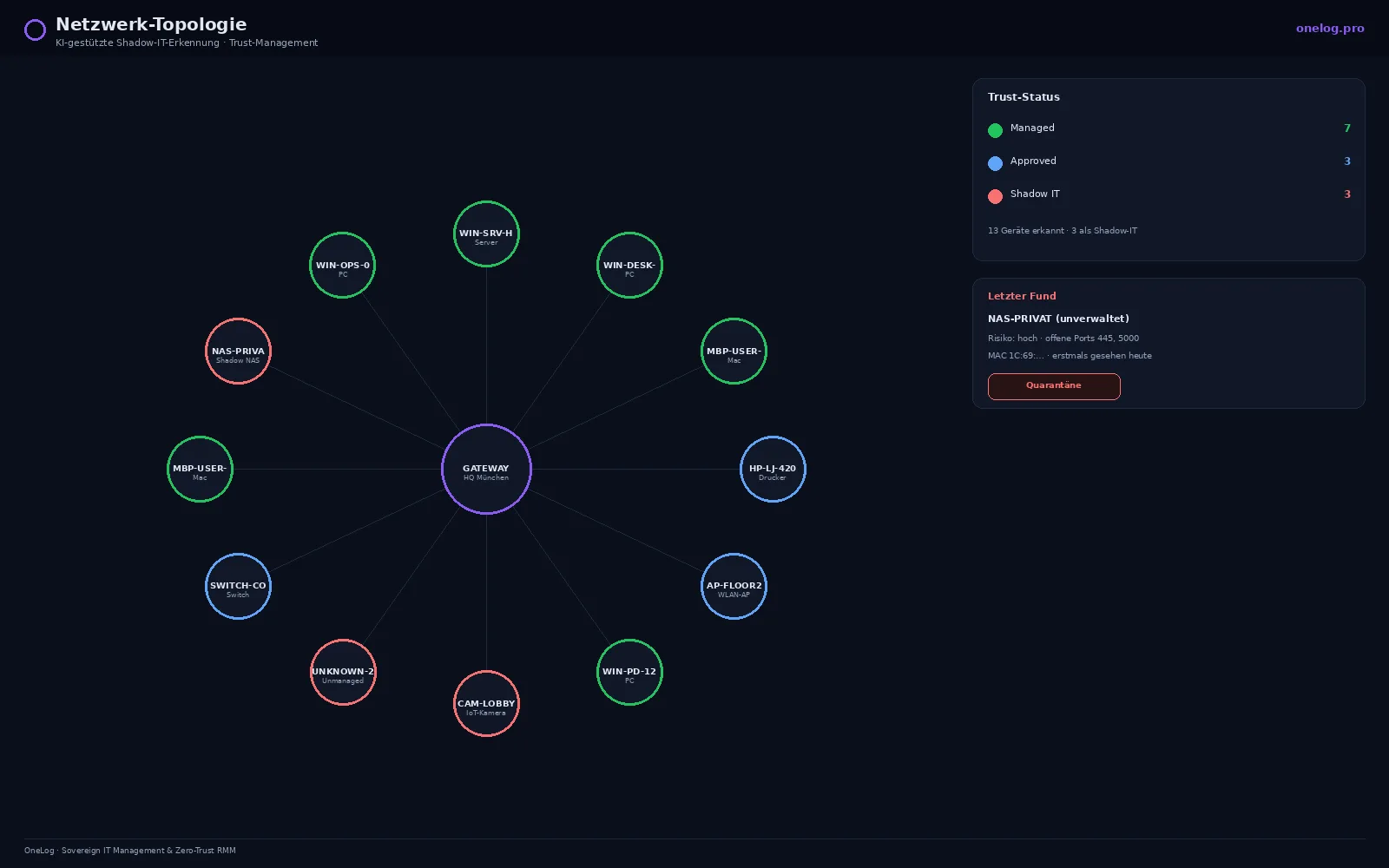
OneLog observes network traffic and identifies every device that communicates. If a device is found that does not correspond to any managed asset, AI-assisted classification takes over: based on behavioural and communication characteristics, it determines what type of device it is and how critical it is.
The result is a continuous network topology in which no device remains invisible — from the domain controller to the unknown endpoint.
Trust status: three levels, clear rules
Every detected device receives a trust status. The status is not cosmetic; it governs the system’s behaviour:
- Managed — managed by OneLog, with agent, fully inventoried and patched.
- Approved — known and approved, but deliberately not agent-managed (such as printers, network hardware, vetted IoT devices).
- Shadow IT — unknown and not approved. To be reviewed first, then approved or isolated.
“Something is hanging on the network” becomes a traceable decision with status, history and a responsible person.
From detection to quarantine
Detection alone is not enough — what matters is what happens next. OneLog lets you define via policy how shadow IT is handled:
- Report — the device is escalated for manual review.
- Quarantine — the device is automatically isolated at network level until it is approved.
- Hand-over to remediation — for manageable devices, autonomous remediation can take over and bring the device into the Managed state.
This closes the gap between visibility and action: an unknown device does not sit in the dashboard as a note for weeks but is handled according to clear rules.
Why this counts for compliance
A complete, up-to-date asset inventory is the prerequisite for almost every security and compliance requirement. NIS2 requires it explicitly, as does ISO 27001. An inventory list that knows only what is managed is by definition incomplete — and incomplete evidence is open to challenge in an audit.
OneLog delivers an inventory that is based on the real network rather than on a manually maintained spreadsheet. Every device, every trust status, every approval or quarantine decision is documented and verifiable.
Sovereign, like the rest of OneLog
Shadow IT detection runs on the same foundation as all OneLog functions: operated EU-sovereign in the STACKIT Sovereign Cloud, ISO 27001:2022, with no US cloud exposure. The network and asset data generated here is particularly sensitive — it does not belong under foreign jurisdiction.
Frequently asked questions
- What is shadow IT and why is it a risk?
- Shadow IT is devices, services or software operated on the network without the IT department's knowledge. They are not inventoried, not patched and appear in no evidence — which makes them a preferred point of entry for attackers.
- How does OneLog detect unknown devices?
- OneLog continuously reconciles actual network traffic with the managed asset inventory. Devices that communicate but are not assigned to any known managed asset are automatically flagged as unknown and passed to AI-assisted classification.
- What does trust status mean?
- Every detected device receives a trust status: Managed (managed by OneLog), Approved (known and approved, but not managed) or Shadow IT (unknown and not approved). The status governs how strictly OneLog treats the device.
- Is shadow IT blocked automatically?
- If you wish, yes. OneLog can automatically quarantine devices classified as shadow IT or report them for manual approval. Which action applies is defined by you via policy.
- Does shadow IT detection help with NIS2?
- Yes. NIS2 requires complete, up-to-date asset management. A complete device inventory including automatic detection of unknown assets is the foundation for that.
See OneLog in your environment
Monitors and maintains your IT remotely and fixes many incidents automatically — hosted in the EU, with no dependency on US cloud providers. NIS2 requirements are built in from the start.